
Author: Fred Widarsson
7 Steps to Accelerating Revenue with RealZips

Organizations using the Salesforce platform are implementing the RealZips app, empowering their whole team.
Users of RealZips are continuously sharing how they are now closing more deals with our app.
This post shows you the 7 steps successful teams take, as they accelerate their revenue with the app and our market data.
What is the RealZips app?
RealZips adds a geographic structure and market data to all CRM data in Salesforce. Your team will have powerful territory management, thanks to our extensive geographic database based on zip codes. The app and it’s data are 100% native, ensuring no security risks and instant user acceptance.
How will we benefit from RealZips?
The app automatically structures existing CRM data by zip codes, cities, metropolitan areas, counties, sales regions, sales territories and more. The benefits are immediate since your team can search and report customer data in new ways – focusing activities in geographical areas that will generate most sales.
How does the RealZips app work?
RealZips is the world’s only GeoData Platform. This is the quick-take:
- 40,000 zip codes are added to your Salesforce in 15 minutes.
- Zip codes have 50 data points, for geographic structure and market data.
- Existing CRM data records are automatically linked to a zip code.
- Sales territories are based on zip codes, linking all CRM data to sales territories.
What are the steps to get started?
RealZips enables organizations like yours to identify growth opportunities and drive sales results. These are the seven steps organizations take while rolling out the RealZips app:
1. Identify Addressable Market
The RealZips app has very deep market data by zip code, enabling your team to pinpoint the total addressable market. The app describes for example corporate targets across 1,000 industries and ranges of employees, including headquarter locations. The demographics data is incredibly deep, ranging across income, age, and lifestyles.
In RealZips, it’s now possible for organizations to distinguish their total addressable market by their primary market and secondary market.
For example, the primary market for your team might be neurosurgeons, while the secondary market would be patients served by these doctors.
Secondary market data is one of the most powerful ways for sales teams to drive trust in discussions with their prospects.
For example, a rep can showcase the RealZips demographics data for the area surrounding the customer’s office.
2. Set Geographic Structure
The RealZips app structures CRM data dynamically across all geographical level. Your team can instantly use e.g. metropolitan areas and counties, to drive successful marketing and sales activities. New geographic levels can be added on the fly, to include areas for specific marketing campaigns!
With a geographic structure in place, existing CRM data is dramatically enhanced and becomes actionable for both marketing and sales teams. With drive time data in RealZips, a lead can be automatically assigned to the closest sales representative or location. Also, drive time data can be used for marketing campaigns based on all customers’ proximity to your sales representatives or locations.
3. Index Market Potential
Many companies miss out on tremendous growth opportunity – simply by not relating each geographic area, to the local market potential – right in Salesforce.
Without market potential in Salesforce, there is no method to track revenue growth against the total addressable market, optimize territories based and prospects, and empower the sales team across territories.
Marketing teams running campaigns without geographic market potential will not be able to target the best-fit areas, missing out on lead generation and revenue growth.
The RealZips app creates automatic indexes for each zip code. Your team will be able to act on each area’s’ market potential and real-time revenue data.
4. Implement Territory Management
The Territory Management module in RealZips effectively combines each territory’s zip codes, market potential and existing leads, accounts and contacts.
Key metrics for each territory roll up from zip codes, giving the sales team a real-time view over where to find and close deals.
A RealZips Territory can quickly be divided into zones based on drive time for the sales representative.
Sales hotspots can be created on the fly within territories, to manage revenue growth in areas with highest market potential.
As territories are changed – customers can quickly and accurately be reassigned to a new territory – complete with a track record of changes.
5. Focus Marketing Activities
It’s a marketers dream to have all leads and customers organized by MSA Metropolitans, cities, CBSAs, counties, sales territories, and regions. The marketing team can run campaigns in zip codes that can be targeted with Google AdWords campaigns, within a 20-minute drive time of the closest representative or location!
Campaigns can be geared towards areas with the high market potential and no current customers. Events can be launched in the exact areas where most leads and customers can quickly travel to.
6. Empower Sales Teams
Most sales teams struggle to build a pipeline of new customers, and closing deals. The RealZips app is simply designed to empower salespeople to be at the right place, taking to the right customers, at the right time.
RealZips cuts down on the search for new customers, allowing the whole organization to focus on areas with most prospects, as close to as possible to your company’s locations.
7. Accelerate Revenue Growth
RealZips can often be implemented in a matter of days. Our customers love to report back on their sales success. We are seeing motivated organizations drive results within weeks, generating net new revenue streams.
Our app is built on 25+ years of CRM experience within companies producing hyper growth. You can now apply our experience of accelerating sales, by rolling out RealZips and market data to your team.
Accelerate Revenue with RealZips for Salesforce
More and more organizations implement RealZips for Salesforce. We’re excited to now share how high-growth companies use our app to propel their success!
The RealZips app provides territory management and a geographic structure for CRM data in Salesforce. Your CRM data is automatically enhanced with geographic data, such as market data, sales territories and sales regions.
RealZips for Salesforce makes it possible to identify market potential and compare against sales performance. Sales teams using the app can focus their efforts in areas with the highest growth opportunity.
These are the six steps to manage growth with RealZips:

1. Industry
Select best-fit industries
The product or service you sell must solve specific challenges for the targeted industry, and be supported by customer success stories. A targeted industry should have enough potential companies of the right size and profile, to be worth pursuing.
Challenges
If your team needs to change the sales pitch for different prospects, it’s takes time to build a high-value pipeline of opportunities. The key is a best-fit industry focus, making the sales pitch consistent. However, switching to a narrow industry focus makes most sales teams uncomfortable, as we all fear of missing out on opportunities.
Find answers
Your team needs data to answer these questions:
- For which industries is our solution a great fit?
- Which of these industries can generate most sales and highest margin?
- Which industries are most profitable, lowering their barrier to buy from us?
- How many companies are there in each of our targeted industries?
- What is our market share and growth opportunity across these industries?
Take action
There are 1,000 industries in the US, defined by NAICS codes (North American Industry Classification System). Each industry is segmented by employee count. For companies servicing B2B in the US, it is crucial to understand the “Perfect Customer” and compare against their existing customer base:
- Download the RealZips NAICS industries spreadsheet, divided by employee size.
- In the spreadsheet, pull out industries you consider selling to.
- Eliminate companies by employee size, that you should not serve.
- Compare against existing customers. The difference is your total opportunity.
Chances are your total market is much larger than your current customer base. Continue to narrow down industries and company sizes. Focus on markets segments where your team will be able close deals fast, with highest possible revenue and margin. Carefully seek out segments with the highest possible stickiness (customer retention / repeat business).
The goal is to find a “Perfect Customer” profile in highly targeted industries.
2. Geography
Focus on markets with highest potential
Once you have a defined your targeted industries by employee size, selecting geographic areas is next. Attempting to serve large geographic areas often leads to inefficient marketing and sales. Therefore, combining industry and geographic focus is crucial for organizations ramping up customer acquisition.
Challenges
Companies that rely on inside sales teams often believe geography does not impact the sales process, since they can engage customers remotely. This could not be more wrong, since geography directly impacts the buying process. Time zone is important, when sending email and making calls. Distance is crucial, when inside sales set up meetings of field reps. Regulations and taxation on state and county levels impact your ability to sell. Never underestimate the importance of your customer’s customers. Focus on geographical areas, where you can help your customer serve a thriving market!
Field sales teams are directly impacted by territory size and market potential across their territories. Many sales reps have failed, either because they were given either too small or too large of a territory. Even if your territories are sized right, are you giving the sales team guidance to focus on geographical growth hotspots?
Find answers
Achieving geographic growth raises many hard questions:
- Where will we find clusters of companies in our chosen target industries?
- Are we geographically organized to tap into these industry clusters?
- Does marketing focus on hotspots in each territory, to drive lead generation?
- Are we generating leads close to each field reps home office, to drive efficiency?
- Can sales reps segment their territories by low, medium, and high growth areas?
Take action
This is where the RealZips app is used to enable the sales team: Your defined target industries are divided across every Zip code, to identify market potential. Each Zip code in RealZips will showcase the number of target companies, rolled up into cities, metropolitan areas, and sales territories.
Next, each Zip code will automatically have the number of existing leads, customers, contacts, activities and opportunities. It is now possible to compare your market potential, against your existing customers.
Lastly, Zip codes are automatically indexed based on market potential and current performance. From that moment, your team can focus on growth areas and track market share:

3. Company
Pick targeted companies in the right areas
You will now know which geographical areas – based on Zip codes – hold the highest growth opportunity. It is now time to identify the companies – across select industries – within the Zip codes that will quickly generate revenue.
Getting data is not the challenge. Instead, selecting the right data and methodically getting in touch with the right companies is the right areas is the hard part.
Challenges
When sourcing companies for targeting, it’s very common to cast a too wide of a net. Since data is cheap, why not get all company names we can? This presents a number of challenges, such as how to assign all the data to the right sales team. Having a access to a lot of company data easily gets in the way of running focused marketing and sales activities, not to mention how quickly data deteriorates.
Find answers
- What are the exact company profiles we are targeting, within our defined industries?
- Where can we reliably source the company data, preferably integrated with Salesforce?
- When importing thousands of records into Salesforce, how do we automatically associate the data with sales regions, territories and sales reps?
Take action
It’s time to further narrow down companies: By location types such as headquarters, years in business, credit rating, use of certain technology, and by dollar spend within the solution you provide. Instead of acquiring large amount of company data your team will never use, focus on high-growth geographic areas.
There are many great sources for company data. As the company data is integrated into your Salesforce system, the RealZips app will automatically associate each record with the right sales territory and sales team. The app structures each record by geographic areas such as city, county, metropolitan area. RealZips for Salesforce can even provide the distance to closest sales rep, office, distributor and service location.
4. Title
Source contacts with the right titles
You now have the right industries, in the right geographic areas, and the right companies your team will target. It’s now time to decide which titles your team will build relations with.
Most often it makes sense to start high in organization, and ask whom to talk to about your solution. It’s also important to get in touch with key stakeholders that influence the decision, and get their buy-in.
Challenges
Sourcing contact data from e.g. LinkedIn and add to Salesforce can be time consuming, even if your team is using automated apps that pull the contact data. Getting reliable email addresses is another challenge. Carefully evaluate how to acquire contact data within your select companies. Avoid at all costs to burden outbound sales reps and account executives to source contact data, since it will slow their sales efforts tremendously.
Find answers
- How can we effectively source quality data on contacts in the right positions?
- How do we reach out and open up discussions with these contacts?
- Which message will resonate with the titles we select to reach out to?
- How do we keep our contact database up to date?
Take action
Your highly targeted approach is now tapping into narrow segments of similar companies, in similar geographic areas, with people in the same positions. Your team can now run micro-campaigns with highly targeted messaging, across your highly defined audience.
While seeding a CRM system with companies and contacts, it’s extremely important to provide all territories and sales teams with as equal opportunities as possible to motivate and empower the team to reach sales quota. Many companies discover they need to optimize their sales territories at this point, enabling the sales team to succeed.
The RealZips app provides key metrics across each sales territory in real-time, used to help the team reach leads and contacts with the right titles:

5. Demography
Utilize underlying demographic data, to identify your customers’ markets
Most companies selling Business to Business (B2B) have yet to discover the value of demographic data. Demographic data is still considered to be “Big Data; too big to use while servicing B2B customers.
We’re now seeing the cutting-edge B2B sales management and sales operations teams take full advantage of demographic data. They simply use population data to understand their customers’ markets, providing talking points and insights downstream in the sales channel.
Challenges
Traditionally, demographic data could not be associated with a specific customer location and did not provide any added value. Demography has been hard to match in real-time against customer locations and linked to revenue growth.
Find answers
- What are the demographic drivers, either for us and for the downstream sales channel?
- How can demographic data be used to improve marketing and sales activities?
- How can localized demographic data be presented in every sales pitch?
Take action
We’re now witnessing companies combine demographic data with all other data in Salesforce, using our app RealZips. The results are surprisingly effective. For example, sales reps showcase demographics around the doctor’s office they are visiting. The customer is given immediate insights into their local consumer market, helping them to identify their growth opportunity associated with your product!
Time and again, we’re seeing this approach generate unexpected new revenue, since your team is now providing unique data, helping your customer connect with their customers.
6. Pitch
Market and sell in the right place, to the right customer, at the right time
We’re now seeing more and more proactive companies use the RealZips for Salesforce app to effectively combine the steps outlined above. Their revenue acceleration can often be noticed within weeks.
With the RealZips GeoData Platform in place, they manage territories and grow revenue. They automatically structure all their CRM data, and break down target markets into manageable geographic chunks. They unleash their marketing and sales activities in highly targeted areas – learning what works best – as they improve their sales process.
High-growth companies effectively adjust the pitch as they discover what works best across targeted industries, geographic areas, companies and certain titles. They utilize all structured data they now have available in Salesforce, to even better service their targeted customer segments.
Get started in a matter of days
The RealZips app and market data is designed to instantly empower your team. In a matter of days, your team could start taking advantage of these six steps:
Why defrag data in Salesforce.com?

Bad data is the #1 productivity killer when using CRM systems. The problem can be solved by structuring your data in Salesforce.com.
Remember years ago when your computer was slowing to a crawl? Recall technically savvy friends giving you 7-step instructions on how to “defrag” your hard drive?
Data problem yesterday: Hard Drive Fragmentation
In the past people kept saving tons of files to their PCs hard drive. When the hard drive filled up, large files could no longer be saved in one single place. Instead, your computer stored fragments of large files in many different places. This was called fragmentation.
You could actually hear a hard drive jumping from place to place trying to pull a file together. The problem was solved with clever software, that organized your hard drive automatically by moving files around so the big files could be stored in one place. When the “defrag” was done, the response time of your computer would improve and you could get your work done faster.
Data problem today: CRM Data Fragmentation
In today’s more advanced technological world, our data is stored in the cloud and most people think they don’t need to worry about defragmenting their data anymore. This is, however, far from the truth.
As everyone using the most popular CRM system in the world, Salesforce.com, keeps adding data to their system every day. This creates a very similar problem – data fragmentation. The more data your team adds, the more fragmented and disorganized your customer data will become.
To give you some examples, someone might import 25,000 leads from an Excel file. The invoice system adds 7,000 customers while duplicating existing data in Salesforce. Before the day is over, another person might add the same customer record five times (true story).
How data fragmentation hurts sales
Let’s say you’re going to Fort Lauderdale to visit some of your customers. When you try searching “Fort Lauderdale” in Salesforce.com, you must type in different spellings such as “Ft. Lauderdale”, “Fort Laderdale” and “Ft Lauderdale” just to find your customers in the system.
You must also need to search in surrounding towns like Hollywood, Dania Beach, Plantation, and Oakland Park. These cities are all in Broward County. If you can’t search across a county or metropolitan area, you’re walking right past many sales opportunities.
Missing millions of dollars in revenue
Take the simple challenge of visiting customers in the Fort Lauderdale area and multiply that across everyone in your company, across all territories, cities and metropolitan areas:
- Can your marketing team effectively invite customers to local events?
- How can sales teams be truly effective while visiting customers in the field?
- Can finance teams run sales reports across states, counties, and metropolitan areas?
- Does sales management know if customer records are owned by the right people?
Defrag data in Salesforce.com
The solution to the problem is simple, all your data in Salesforce must be “defragged”. Every customer record must be associated with a zip code, city, county, metropolitan area, plus the right sales territory and sales region. When your customer records drop into the matrix of a complete geographical data structure, all customer data will immediately become useful.
Defragmenting data in Salesforce is an automatic process that works much like the software that structured your hard drive. The RealZips app will do the job for you, automatically matching customer records to zip codes and creating a complete geographic data matrix.
Get back to connecting with customers
When the RealZips GeoData is in place, your customer data in Salesforce.com can be put to use like never before:
- Sales can search customers across cities and counties, planning effective field trips.
- Marketing can run campaigns across any geographic area with great efficiency.
- Everyone searching for customer data and running reports will no longer be frustrated.
- Data analytics will be fun, immediately finding new business opportunities to call on.
Match CRM data in Salesforce with sales people

Most organizations struggle to match CRM data with the right sales person.
The effort to continuously align your company’s customer data in Salesforce with the right sales people is overwhelming and costly. Most organizations have a lot of customer records owned by the wrong sales person. Many of us have seen what this causes:
- Commissions are paid to the wrong sales people.
- Sales people do not meet their quotas.
- Customers are not being called on by the right people.
- Sales teams can not get a true overview of their customers.
- Mailers are sent out with the wrong sales person’s name listed.
We built RealZips to make it possible for companies to instantly align all their Salesforce CRM data with the right sales person. The current challenge around ownership can within days be turned into an opportunity to drive even greater sales success.
Solving ownership challenges permanently.
Oftentimes, we found ourselves having to align thousands of customer records with the right owner. This challenge turned into the reason for building RealZips. By now, we love hearing the excitement from customers, as they align ownership and set themselves up for sales success. We still find find it amazing to learn how our customers keep all their CRM data aligned over time:

Calculate your risk. Then solve your ownership challenges once and for all.
Calculate how much time your team can save by using our app. Find out how to minimize legal risk for everyone and drive success for your sales team.
Put our ROI Calculator to use.
- Fill in the yellow boxes with your organization’s ballpark values.
- Estimate the risk of revenue being assigned to the wrong person.
- Identify your current risk of commissions being paid out incorrectly.
- Calculate how much time your team can save with RealZips.

When all CRM data in Salesforce is owned by the right person or sales team, both marketing and sales can operate more effectively. The benefits of having CRM data matched with your sales people spans across all internal and external stakeholders.
Can Sales Territory info in Salesforce drive success?

My first job was selling computer systems. I was 19 years old and it was an easy job at first. As more salespeople joined, we had to continuously change sales territories. As the company continued to grow, matters related to sales territories became increasingly complicated.
Being part of a growing sales team, there were many things that kept us awake at night. Are sales territories planned to give us all the same potential? Do other salespeople own customers inside my territory? Am I getting the right commission payout? What are my colleagues’ territory borders?
Ever since my first job, these questions turned out to be similar across most sales teams that grow or change over time. We figured there must be a better way to manage territories.
What if we build an app for Salesforce.com that will
- Use zip codes as the base for sales territories.
- Connect zip codes to all existing CRM data in Salesforce.
- Allow one sales rep or many reps to own each zip code.
- The territory information is then shared across the organization.
Every zip code should be available inside your CRM system. Each zip code should have information related to all sales territory information. Here’s an example of territory information for zip code 10019 in New York:

With the app we built, it is now possible to empower the sales team to drive their success. By making all territory-related information available to everyone in the organization, issues regarding to territory borders becomes a thing of the past. The Salesforce Administrator can add as many salespeople to each zip code as needed, in case your organization operates in for example industry verticals. Resellers, stores and partners can be added to each zip code in the RealZips app.
Sharing territory information for success
When your organization openly shares territory changes, it creates full transparency and reasons to collaborate across the team. The end goal is to connect faster with your customers, which drives success both for customers and your team.
As market conditions change, sales territories must change to better serve customers and balance potential across the territories. Sales territory changes create complexity for the sales team, as territory borders are moved and customers change hands.
By simply tracking all territory changes with full transparency in Salesforce.com, the uncertainty related to territory changes is a thing of the past:
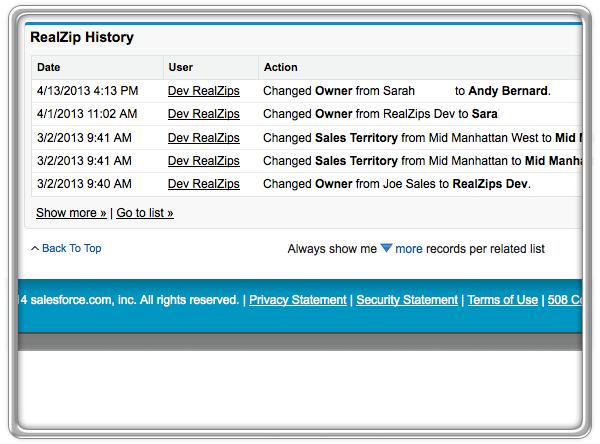
By using our app in your Salesforce CRM system, your team will be empowered to faster connect the right salesperson with the right customer. Uncertainty around sales territories will no longer hold back the team. Instead, everyone has information on sales territories to drive both individual and team sales goals.
Customer feedback
For the team behind the app, it’s a truly exciting journey to help our customers be even more successful. People using RealZips are telling us:
- Everyone can quickly reference the sales team members in every zip code, city, county, metropolitan area, state and sales territory.
- At trade shows we can instantly tell prospects who their sales person is.
- Territory changes can be viewed by everyone, clearing up challenges related to ownership of customers, quota attainment, and commission payouts.
Why enrich CRM data in Salesforce.com?

After 25 years of developing and running CRM systems, every organization we meet has the same question:
The sales and marketing teams can’t find their own data. How do we fix it?
If your team can’t search customers and analyze data, many things happen:
- Duplicate records are added, making it even harder to find data.
- Sales can’t find customers in the CRM system while traveling in the field.
- Marketing can’t effectively target cities, counties or metropolitan areas.
- The team’s trust in your organization’s data goes down.
- Overall usefulness of your CRM data is questioned.
We have witnessed numerous times how this scenario plays out. We kept thinking there must be a better way. What if we added Geographic Data to your CRM data?
What is GeoData?
Geographic Data (GeoData) is geographic data points of many types that enrich your customer data. Samples of GeoData are zip code validation, city and county names, metropolitan areas and time zones. GeoData also adds demographics, federal regions, your organization’s complete sales territory information and more.
Why everyone needs GeoData
Search for “Fort Lauderdale” in your CRM system. Then, try to find all customers in that city by searching for “Ft Lauderdale.” Most likely you won’t find many until you also search for misspellings such as “Ft. Lauderdale” and “Fort Laderdale.”
Next, you want to reach out to customers in towns near Ft. Lauderdale. Include the neighboring town “Hollywood” in your search. Now, your result will likely include customers in many other states:

How GeoData empowers your team
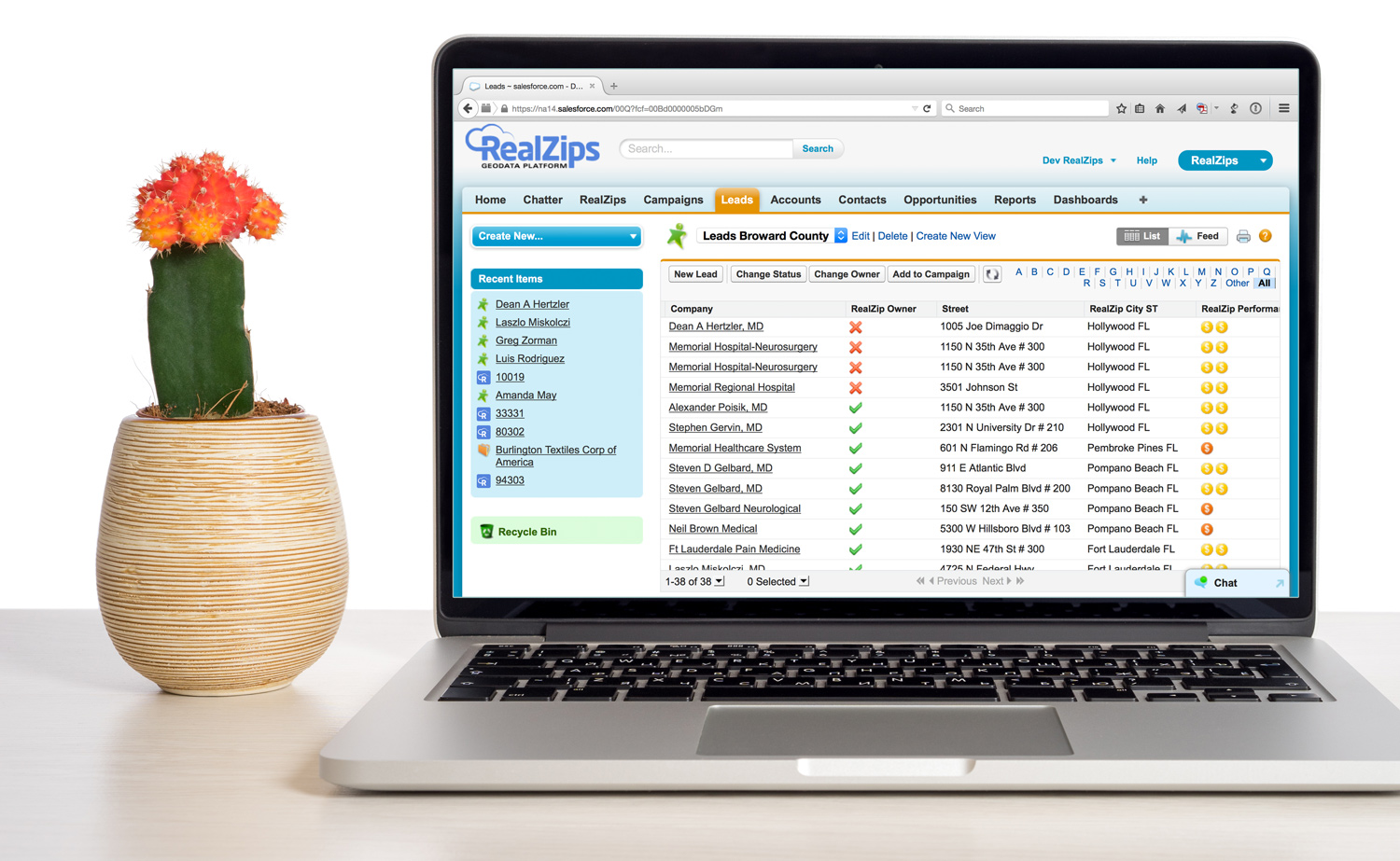
With all your CRM data enriched with GeoData, a search for “Fort Lauderdale” would uncover all the right customers immediately. If you need to include surrounding cities, simply search for the county “Broward FL.”
Within seconds, you can view customers in the cities near Fort Lauderdale:

How GeoData drives sales success
The reasons to enrich CRM Data with GeoData are compelling:
- Adding GeoData is a very quick process, providing a fast ROI.
- Your CRM data will have a robust and useful geographic structure.
- Searches, reporting and analysis will be very powerful for everyone.
Your entire organization will be able to do new things:
- Search customer data across zip codes, cities, counties, metropolitan areas, sales territories, sales regions, time zones and federal regions.
- Match up areas with great business potential against your lead data.
- Your team will gain trust in their CRM data.
GeoData is intended to drive success by identifying and targeting the right customers, which will enable your team to close more deals.
Sample Salesforce Lead record enriched with GeoData
Salesforce records can be enriched with any type of GeoData. In the sample below, a Lead has been enriched with city, county, time zone, owner matching and more:
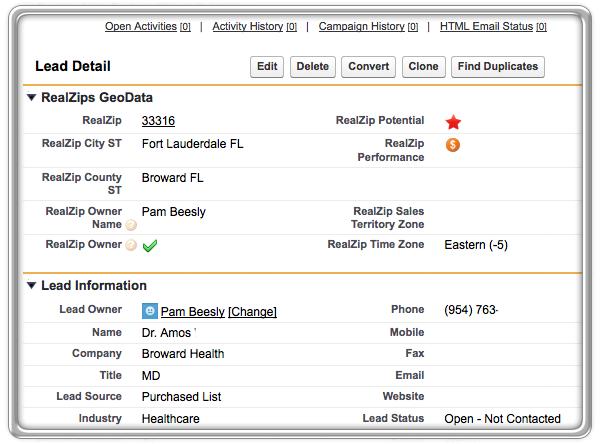
Hoping this blog helps bring ideas for your team on how to put GeoData to use in Salesforce. Please comment below.
Need to Align Ownership across Salesforce.com?
Having worked with CRM systems for 25 years, the challenge was always the same:
“We must align ownership of customer data, to match up with sales territories”
Aligning ownership is a moving target that’s impossible to keep up with. Sales territory borders change, salespeople get new jobs, not to mention customers moving to new cities.
The effort involved in trying to keep ownership aligned is overwhelming and costly. If your organization does in fact have customer records owned by the wrong salesperson, most of us know what happens:
- Commissions are paid to the wrong sales people.
- Sales people do not meet their quotas.
- Customers are not being called on properly.
- Sales people can’t get a true overview of their own customers.
- Mailers are sent out, with the wrong sales peoples’ names listed.
Seeing all this happen in front of our eyes, we knew there had to be a better way.
Imagine being able to see if a record has the wrong owner:
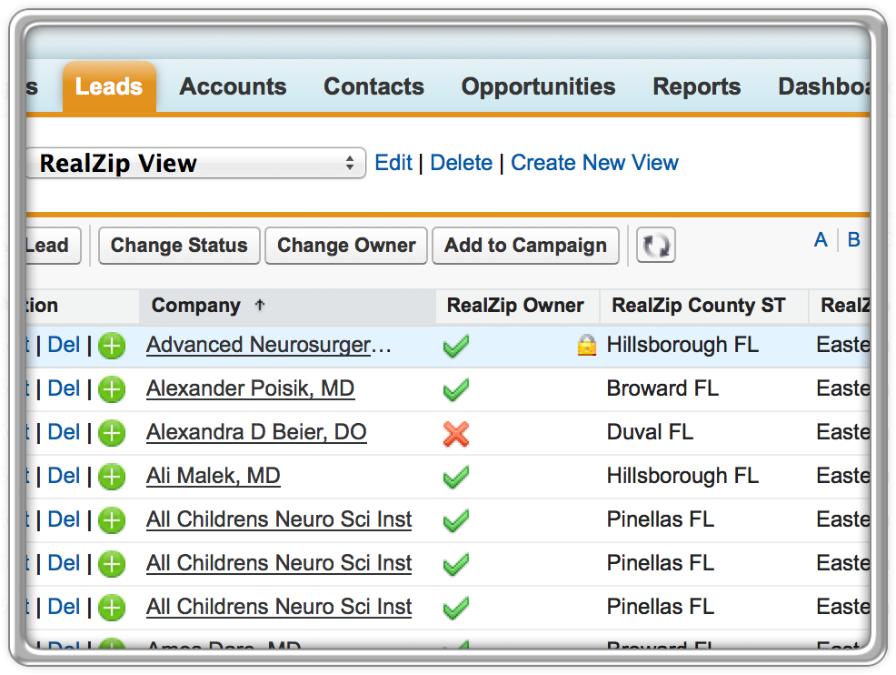
We understood that having capability to align ownership across data in Salesforce.com would have a fundamental impact for most organizations:
- The sales team can immediately spot and correct mistakes.
- The Salesforce Admin is empowered to transfer thousands of records in minutes.
- Your whole team’s trust in your company’s data would improve.
- Your company would be able to connect faster and deeper with customers
Helping teams solve these challenges
After living with these pain-points ourselves for many years, It is now truly exciting to solve these challenges and empower our customers’ entire organizations with our app.
The best part is when our customers call us and letting us know they’re saving 100+ hours in less than 60 minutes. We never get tired of listening to our customers, as they’re telling us how much they love to be able to align ownership across their CRM data.